Octopus Sandbox Tips & Tricks for Chaos
Performance habits, creative challenges, and ways to keep solo sessions fresh.
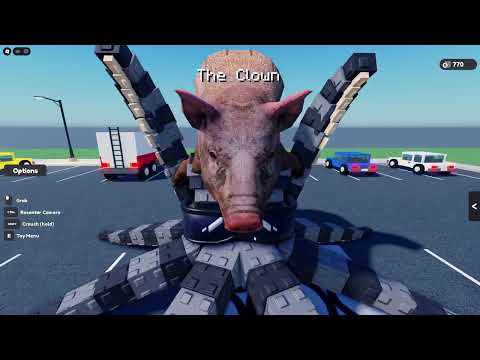
These Octopus Sandbox tips and tricks assume you already know the basics from Getting Started and can land intentional hits from Controls and Destroy the City. Now the goal is longevity: smoother frames, funnier clips, smarter challenges, and less frustration while Duck Fighter Studios ships FIX patches.
Remember the shape of the game: solo sandbox, giant octopus, terrorize the world, physics first. Tips below optimize that fantasy—they do not invent hidden RPG trees.
Performance tips (keep the chaos readable)
- Lower graphics before the city is rubble, not after you are already stuttering mid-combo.
- Pause swings when props explode into confetti; let the solver breathe.
- Avoid constant camera spin through dense particles—your GPU and your inner ear will thank you.
- Relaunch after long sessions. Solo instances still accumulate simulation junk over time.
- Close heavy background apps on laptops; octopus physics is sneakily expensive.
- After a titled [FIX] update, test on medium settings first so you can tell patch gains from hardware luck (November 2026 FIX).
If supports disappear inside effects, you cannot aim—performance is literally part of controls.
Chaos tips that look better on camera
- Seed a lean, then orbit once before the finish for free drama.
- Clear a “stage�?of soft props so the hero building reads cleanly.
- Strike, wait, strike—rhythm sells weight better than panic mash.
- Finish sessions on a landmark kill so your last memory is intentional.
- Try the becoming-an-octopus vibe from community shorts (see the embed) then apply sharper support aim than pure flail energy.
Creative challenge menu
Rotate these when districts feel samey:
| Challenge | Rule |
|---|---|
| Corners only | No rooftop taps |
| One district spiral | No leaving until the 360° check is clean |
| Silent camera | Minimal spin, deliberate pans |
| Soft-prop bowling | Use cars/props as appetizers only for two minutes |
| FIX mirror | Same route pre/post patch, note differences |
| Tier locked | Play only one lane from the Tier List for a full session |
Challenges replace the missing multiplayer banter. Share results with friends outside the server—see Players for why maxPlayers 1 still supports a social fandom.
Mindset tricks for a young game
- Expect FIX turbulence. Early November patches exist because the sandbox is alive. Check the Updates Hub before rage-reinstalling your personality.
- Ignore fake gift economy stress. Codes are unconfirmed; you are not “behind�?for playing vanilla.
- Reject executor FOMO. Scripts stay empty of verified game-specific pastes for good reason.
- Measure improvement. Same block, cleaner collapses, less time wasted re-centering.
Micro-habits between swings
- Exhale on the commit hit (yes, really)—reduces mash spam.
- Name the target out loud (“left corner, brown tower�? to force intention.
- After three misses, change height before changing district.
- Every five minutes, zoom fully out and pick the next two targets only.
These sound silly until your clip folder fills with readable demolitions instead of motion blur.
Session structure template
0�? min: Warm-up props + sensitivity check.
5�?5 min: Primary district using Controlled Demolition or your chosen tier lane.
25�?0 min: Performance break / settings tweak.
30�?5 min: Challenge mode or cinematic orbit hunts.
Last hit: Landmark closer, then quit while frames are still proud.
Longer sessions are fine if you insert settle breaks. The sandbox will happily let you play until the city is soup—discipline is on you.
Troubleshooting quick table
| Symptom | Try this |
|---|---|
| Rubbery hits | New angle/height; relaunch after FIX |
| Nausea | Lower spin, Controlled Demolition only |
| Boredom | Challenge menu + tier lock |
| “Need scripts�?itch | Re-read Scripts hub; practice corners |
| FOMO on codes | Codes hub status; smash anyway |
Badges and toys between smash sessions
When districts feel repetitive, rotate into Toys and Tools drills (Toy Gun facades, Shield lamp lines) or chase the five live challenges on Badges. Those loops keep solo sessions fresh without needing unconfirmed Codes.
Cross-links to stay oriented
- Hub index: Guides
- Toys: Toys and Tools
- Badges: Badges
- Beginner framing: Getting Started
- Inputs: Controls
- Smash plans: Destroy the City
- Style ranks: Tier List
- Patch context: Updates
Final trick
The strongest tip is boring: one intentional building is more satisfying than twenty confused nudges. Octopus Sandbox rewards clarity. Use performance headroom to see supports, use challenges to stay creative, and let FIX waves improve the toy while you improve the pilot.
Now hop back in and make the next collapse look like you meant it.
Frequently Asked Questions
Quick answers to the most common questions.
How do I stop lag when the city is destroyed?
Lower graphics early, pause swings to let props settle, avoid camera spinning through particles, and relaunch after very long sessions.
What is a good practice routine?
Warm up on soft props, clear one district with intentional corner hits, take a short break, then run a creative challenge.
How do I keep solo play from getting boring?
Use the challenge menu—corners only, silent camera, tier-locked sessions—and compare clips with friends outside the server.
Should I change settings after FIX patches?
Retest on medium settings first so you can feel stability changes, then retune graphics once you know the patch baseline.
Do tips replace the other guides?
No. They layer on top of Getting Started, Controls, and Destroy the City. Use the Guides Hub if you need the full path.